Medical Roll Up Template: A Designer's Guide to Effective Use
You've got about three seconds to make an impression at a trade show or in a busy clinic lobby. A well-designed banner isn't just a backdrop; it's your silent salesperson. That's where a thoughtfully crafted Medical Roll Up Template comes into play. It's not just a pre-made file; it's a strategic starting point designed to communicate professionalism and clarity in environments where both are non-negotiable. This particular template is built with the practical needs of healthcare providers, clinic managers, and medical marketers in mind, offering a visually clean and easily adaptable foundation for your brand's physical presence.
More Than Just a Pretty Layout
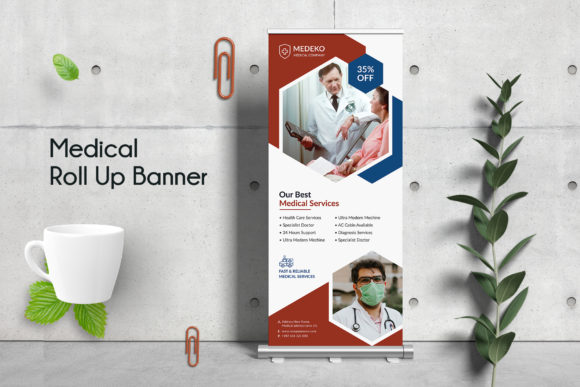
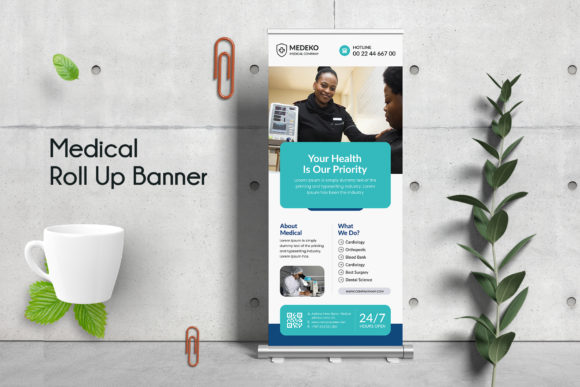
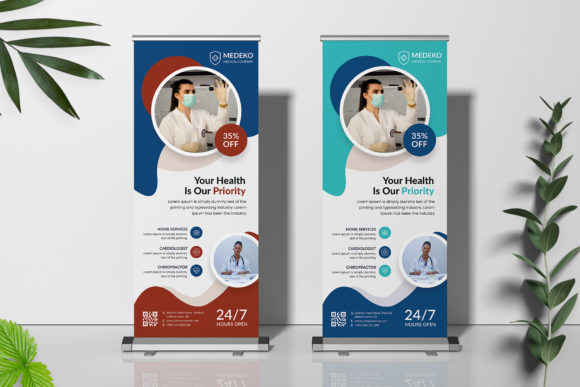
What makes a medical banner template visually appealing? It's the balance between sterile professionalism and approachable warmth. This design avoids clutter, using ample white space to guide the eye toward key information. The color palette is intentionally calming—think soft blues, clean whites, and accent greens—colors that subconsciously signal trust and health. The typography is modern and highly legible, ensuring your message is readable from a distance. Every element is placed to create a visual hierarchy, so your clinic's name, core services, and contact details are instantly prioritized. It’s a design that works with you, not against you, to make a positive first impression.
The true value, however, lies in its structure. Built in Adobe Photoshop with fully organized layers, it’s engineered for easy customization. You can swap out the placeholder text for your clinic's name, adjust the color scheme to match your existing brand guidelines, and insert your own high-quality images of your facility or team. The use of smart objects means you can update logos or specific image frames without breaking the design, a huge time-saver for anyone who isn't a graphic design expert. The inclusion of popular, free fonts means you won’t face licensing headaches, and the print-ready specifications—CMYK color, 150 DPI, and a 30x70 inch size with bleed—ensure what you see on screen is what you get in print, without surprises.
Practical Applications Beyond the Clinic
While the immediate use case is clear, the flexibility of a well-structured Medical Roll Up Banner Template extends far beyond a simple waiting room display. Think of it as a cornerstone for your entire physical marketing collateral. The visual system you establish with this banner can be adapted to create a cohesive brand identity across multiple touchpoints.
- Event Marketing: Use it as the anchor for your booth at health fairs, community wellness events, or professional conferences. Its professional appearance immediately establishes credibility among peers and potential patients.
- Internal Branding: Place it in your office's main hallway or break room to reinforce your mission and values to your staff, boosting morale and unity.
- Service Highlight: Customize separate banners for different departments or specialties—pediatrics, physiotherapy, diagnostics—to guide patients and market specific services within your facility.
- Partnership Displays: For collaborations with pharmacies, labs, or other health services, a co-branded banner can be a powerful tool for joint ventures.
The design principles embedded in this template—clean lines, professional typography, and strategic use of color—are exactly what you need for other marketing assets. The same header fonts can be used on your appointment reminder cards. The color codes can be applied to your email newsletter templates. The image treatment style can be mirrored on your social media profiles, creating a seamless visual journey for anyone interacting with your brand, whether online or in person.
Ensuring Your Message Resonates
A beautiful design fails if it doesn't communicate effectively. This is where the practical features of the PSD file become critical. The emphasis on readability isn't an accident; it's a core requirement for medical communication. You need patients to quickly find your phone number or understand your operating hours from across the room. The high-resolution format ensures that even when printed at its full 30x70 inch size, text remains crisp and images stay sharp, avoiding any pixelation that could undermine your professionalism.
When you dive into editing, keep a few strategic considerations in mind. First, resist the urge to overload the space. The template's strength is its clarity. Stick to one primary message and a clear call to action. Second, be intentional with your imagery. A photo of a friendly, diverse team is often more powerful than a stock photo of generic medical equipment. Third, test your design. View it from 10 feet away on your computer screen. Is the clinic name legible? Do the service offerings stand out? Ask a colleague who hasn't seen it before for their first impression. This simple step can reveal usability issues you might have missed.
Finally, remember that this template is a starting point. It provides the professional framework, but your unique brand personality needs to shine through. Use the editable color layers to inject your specific brand hues. Adjust the layout slightly if your logo has a different aspect ratio. The goal is to use the template's inherent design logic to elevate your own branding, not to create a generic piece that could belong to any clinic. By doing so, you leverage a professional design asset to build trust, enhance recognition, and effectively communicate your value to the community you serve.