Streamline Your Workflow with a Professional Business Invoice Template
Managing the financial side of a creative business often feels like a juggling act. You pour your energy into client work—designing logos, building websites, crafting marketing campaigns—but the administrative tasks, especially invoicing, can become a source of friction. A generic, text-heavy document feels out of place next to your polished work, and manually calculating line items for every project is time you could spend on revenue-generating activities. This is where a thoughtfully designed invoice template becomes more than just a bill; it becomes an extension of your professional brand and a tool for operational clarity.
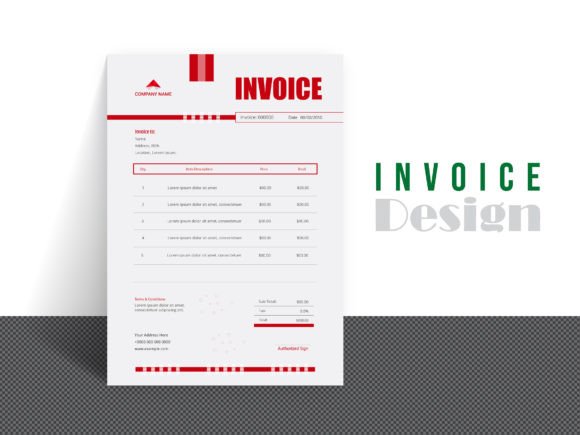
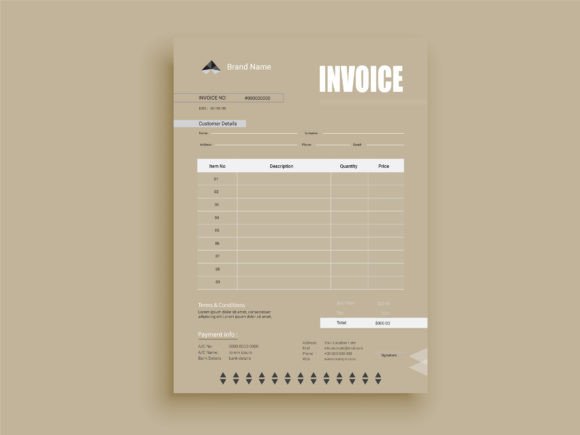
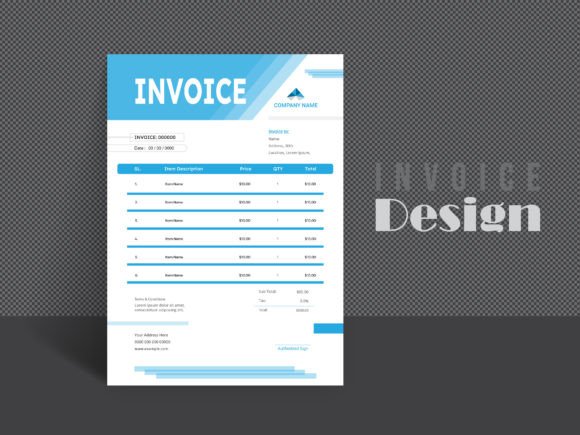
A Professional Business Invoice Template is built to solve this exact problem. It’s a pre-formatted document designed to help you list and count every piece of work on every project you undertake. Think of it as a structured canvas. Instead of starting from a blank page or a cluttered spreadsheet, you have a clean, organized layout that guides you to input project details, itemize services or products, apply taxes, and specify payment terms. The real value lies in its adaptability. This template is fully editable and customizable in popular software like Adobe Illustrator, Adobe Photoshop, and Microsoft Word, meaning you can seamlessly integrate it into your existing workflow, regardless of your primary design tool.
Beyond the Basics: Design That Communicates Professionalism
What sets this template apart is its attention to design and technical specifications, which directly impact how your business is perceived. The A4 size with bleed ensures your printed invoices look crisp and professional, with no awkward white edges. A 300 DPI resolution guarantees sharp text and graphics, whether you’re printing it in-house or sending it to a professional printer. The use of free fonts means you won’t incur additional licensing costs, a practical consideration for bootstrapped entrepreneurs and freelancers.
Perhaps the most significant feature for designers and brand-conscious businesses is the vector-based, scalable design. This means your invoice isn’t just a static document; it’s a flexible design asset. You can scale it to any dimension without losing quality—perfect if you decide to create a larger format for a project summary or a smaller, condensed version for digital use. The well-organized layers in the AI and EPS files make customization intuitive. You can easily change color modes to match your brand’s exact palette, swap out placeholder text for your business details, and adjust the layout without digging through a chaotic file structure.
Practical Applications for the Modern Creative Business
The utility of a Professional Business Invoice Template extends far beyond simply sending a bill. It’s a tool for reinforcing your brand identity at a critical touchpoint—the moment of payment. When a client receives an invoice that visually aligns with your website, social media graphics, and other marketing materials, it reinforces your professionalism and attention to detail. This consistency builds trust and recognition.
Consider these real-world applications:
- For Freelance Designers and Agencies: Itemize complex projects with clarity. List out concepts, revisions, final deliverables (like logo files in various formats), and licensing fees separately. This transparency prevents disputes and justifies your value.
- For E-commerce and Product-Based Businesses: Use it to invoice for wholesale orders, custom merchandise, or packaging design services. The scalable vector design is perfect for including product sketches or mockups directly on the invoice for reference.
- For Consultants and Service Providers: Clearly break down hourly rates, retainer fees, and project-based costs. A professional presentation makes your financial communications feel as polished as your consulting advice.
- For Content Creators and Marketers: Invoice for campaign management, social media graphics packages, blog writing, or video production. The organized layers allow you to easily create different invoice versions for different service tiers.
Using this template helps improve visual consistency across all your client-facing documents. It enhances brand recognition by ensuring your colors, fonts, and logo placement are consistent. It boosts readability with a clean, well-organized layout that clients can understand at a glance. Ultimately, it contributes to a more professional presentation, which can positively influence client perception and encourage timely payments.
Integrating the Template into Your Creative Process
Getting started is straightforward. After downloading the file, you’ll choose the format that best suits your software. If you’re a graphic designer comfortable with Adobe Creative Cloud, the AI or EPS file offers the most control. If you primarily work in Microsoft Office, the Word file provides a familiar environment for customization.
Here’s some practical advice for making the most of it:
- Brand Alignment First: Before you fill in a single line item, spend ten minutes customizing the template’s colors and adding your logo. Save this as your “master” template. This ensures every invoice you send is on-brand from the start.
- Create a Library of Services: Build a text file or note with pre-written descriptions for your most common services (e.g., “Logo Design – Initial Concepts & 2 Revisions,” “Social Media Management – Monthly Package”). This saves time and ensures consistent terminology.
- Test Your Print: Always do a test print on your office printer. Check that the text is legible, the colors translate well to print, and the bleed area (if you’re printing to the edge) is handled correctly by your printer settings.
- Leverage the Scalability: Because it’s a vector file, you can create a simplified, smaller version for quick digital estimates or a detailed, large-format version to accompany a physical portfolio piece.
Remember, the images used in the preview are for demonstration only and are not included in the main file. This keeps the download clean and focused on the template itself, free from external licensing concerns. The included JPEG file is useful for quick previews or as a reference image, but the editable files (AI, EPS, Word) are where you’ll do your actual work.
In the end, a well-executed invoice does more than request payment. It communicates that you value your own work, respect your client’s time with clear documentation, and operate a business that is organized and trustworthy. By choosing a Professional Business Invoice Template that is both functionally robust and visually cohesive with your brand, you turn a routine administrative task into another opportunity to reinforce your professional identity and streamline your operations, leaving you with more time to focus on the creative work that matters most.